

How to Change Number of rows fetched by SAP BusinessObjects Report?
By @Jin5 min read
Why need to change the limit of rows from a universe?
By default, a universe is limited to 5000 rows of data. If your BO Report exceeds the 5000 rows, you may miss out on critical data or insights. Therefore, changing the limit of rows from a universe allows users to access and analyze a larger set of data, thereby enabling more comprehensive and detailed reporting and analysis within SAP BusinessObjects.
How to change the number of rows from a universe?
To change the number of rows fetched by a SAP BusinessObjects Report, you can follow these steps:
- Open the universe in the Information Design Tool

- Please choose the universe you wish to modify and access the relevant Business Layer within the universe. Then, remove the restriction on the Limit size of result set in Query Options, or input a larger value.
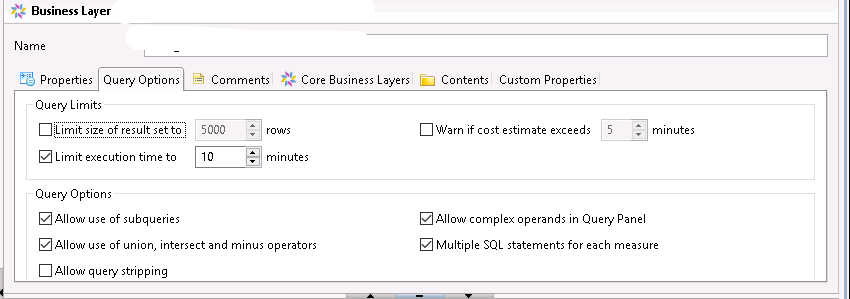
SAP BO default execution time
The default execution time for a universe is limited to 10 minutes. If the running time for the result exceeds 10 minutes, then we need to disable the Limit execution time to in Query Options, or input a larger execution time.
Related Articles
- Getting the List of Universes SAP Business Objects using Python
- How to Get the List of SAP BusinessObjects Schedules using Query Builder
- Python Web Scraping in SAP Business Objects CMC: Get the List of Schedules
- Where to Write Python in Azure - Building the Python ETL Pipeline
- Data Analyst: Does Your Work Actually Matter?
The newsletter
Data in the Age of AI
Exploring how AI is reshaping business intelligence, data architecture, and the way organizations work with data. Get new essays from @Jin delivered to your inbox.
Visit the publication on Substack →Add Comments
Comments
Loading comments...