

How to Get the List of SAP BusinessObjects Schedules using Query Builder
By @Jin5 min read
Introduction
To retrieve a list of SAP Business Objects schedules using Query Builder, you can execute a query against the repository database where the scheduling information is stored. The repository database typically contains tables with information about schedules, jobs, and other related objects. Here are the general steps:
Access and Log in to Query Builder:
To access Query Builder directly, log in to Query Builder using your SAP Business Objects credentials by entering the following URL in your web browser:
http://localhost:port/AdminTools/querybuilder/ie.jspAfter replacing localhost:host you will see the login page:

Build Query:
SELECT
    SI_ID,
    SI_NAME,
    SI_SCHEDULEINFO.SI_SCHEDULE_TYPE,
    SI_SCHEDULEINFO.SI_SCHEDULE_INTERVAL_NDAYS,
    SI_SCHEDULEINFO.SI_SCHEDULE_INTERVAL_NTHDAY,
    SI_SCHEDULEINFO.SI_SCHEDULE_INTERVAL_MONTHS
FROM
    CI_INFOOBJECTS
WHERE
    SI_SCHEDULE_STATUS != 8 AND SI_RECURRING = 1
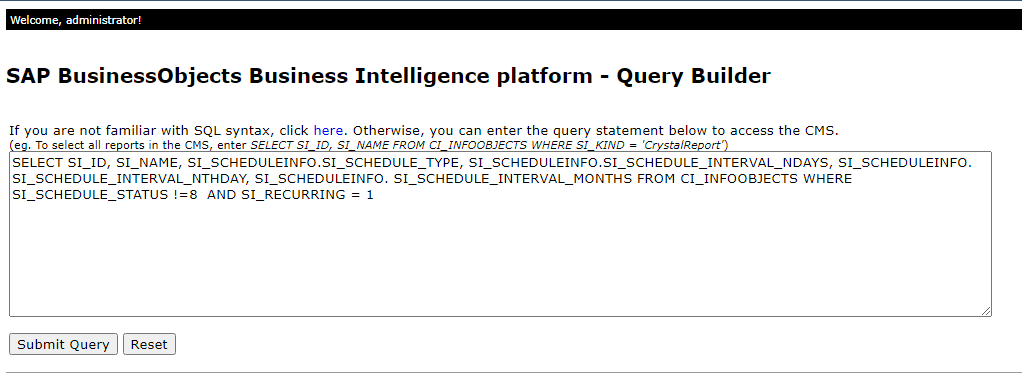
the script retrieves specific columns (SI_ID, SI_NAME, and scheduling-related information) from the CI_INFOOBJECTS table for objects that meet the specified conditions. The conditions filter out objects with a schedule status of 8 and include only recurring objects.
Execute Query:
Copy and Paste the SQL Script, Then Submit the Query
Review Results:
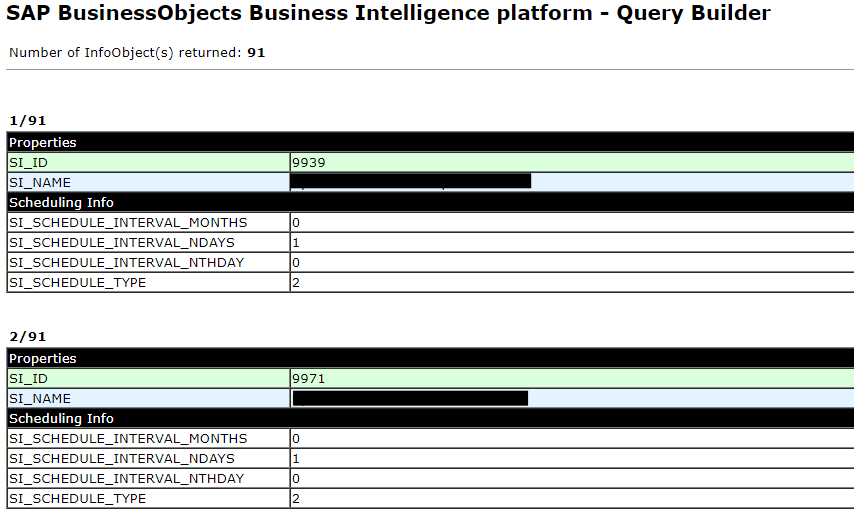
After the query execution is complete, the results will be displayed in the Query Builder interface.
Related Articles
- Getting the List of Universes SAP Business Objects using Python
- How to Change Number of rows fetched by SAP BusinessObjects Report?
- Automate SAP Report Extraction with PyAutoGUI
- Unlocking SAP BusinessObjects Data: A Comprehensive Guide to Retrieving Documents with Python
- Python Web Scraping in SAP Business Objects CMC: Get the List of Schedules
The newsletter
Data in the Age of AI
Exploring how AI is reshaping business intelligence, data architecture, and the way organizations work with data. Get new essays from @Jin delivered to your inbox.
Visit the publication on Substack →Add Comments
Comments
Loading comments...